↓
 

The PolyBlog

My view from the lilypads

  • Home
  • Goals
    • Goals (all posts)
    • #50by50 โ€“ Status of completion
    • PolyWoggโ€™s Bucket List, updated for 2016
  • Life
    • Family (all posts)
    • Health and Spiritualism (all posts)
    • Learning and Ideas (all posts)
    • Computers (all posts)
    • Experiences (all posts)
    • Humour (all posts)
    • Quotes (all posts)
  • Photo Galleries
    • PandA Gallery
    • PolyWogg AstroPhotography
    • Flickr Account
  • Reviews
    • Books
      • Book Reviews (all posts)
      • Book reviews by…
        • Book Reviews List by Date of Review
        • Book Reviews List by Number
        • Book Reviews List by Title
        • Book Reviews List by Author
        • Book Reviews List by Rating
        • Book Reviews List by Year of Publication
        • Book Reviews List by Series
      • Special collections
        • The Sherlockian Universe
        • The Three Investigators
        • The World of Nancy Drew
      • PolyWogg’s Reading Challenge
        • 2026
        • 2023
        • 2022
        • 2021
        • 2020
        • 2019
        • 2015, 2016, 2017
    • Movies
      • Master Movie Reviews List (by Title)
      • Movie Reviews List (by Date of Review)
      • Movie Reviews (all posts)
    • Music and Podcasts
      • Master Music and Podcast Reviews (by Title)
      • Music Reviews (by Date of Review)
      • Music Reviews (all posts)
      • Podcast Reviews (by Date of Review)
      • Podcast Reviews (all posts)
    • Recipes
      • Master Recipe Reviews List (by Title)
      • Recipe Reviews List (by Date of Review)
      • Recipe Reviews (all posts)
    • Television
      • Master TV Season Reviews List (by Title)
      • TV Season Reviews List (by Date of Review)
      • Television Premieres (by Date of Post)
      • Television (all posts)
  • About Me
    • Subscribe
    • Contact Me
    • Privacy Policy
    • PolySites
      • ThePolyBlog.ca (Home)
      • PolyWogg.ca
      • AstroPontiac.ca
      • About ThePolyBlog.ca
    • WP colour choices
  • Andrea’s Corner

Category Archives: Book Reviews

Post navigation

← Previous Post

More workplanning on my new Calibre library

The PolyBlog
March 28 2026

I wrote earlier this week (Using Calibre to embrace my inner librarian for ebooks) about the Poly Library 3.0, and when I did, I thought I had most of my “work” done. I had decided on three main areas (the book profile, user engagement, and user tools), although, truth be told, I had four categories that were more easily explained as three…I feel like some of the user engagement and user tools could theoretically be separated into a fourth category, but I digress. I had also decided on about 35 new basic fields, though that number will grow once I start adding visual icon fields, etc.

But I asked some other questions on the Calibre sub-Reddit, and the answers sent me scurrying into lots of different additional areas. Squirrel mode activated! Albeit in (mostly) a good way. ๐Ÿ™‚

In the meantime, I dropped about 1500 books off at Value Village today. My paper library is almost decimated. I still have about 400 or so, but the rest? Gone. A project I’ve been wanting to do since 1998. Just finally had the chance to do it properly over the last few weeks with more time at home with Jacob. Now it’s on cleaning up my ebook library. Oooh, and a friend dropped by last night with his daughter and took about 50 books away with them. Not counting the one I gave to a friend across town last month, and about 10 that went to Jacob and Andrea’s library. I would love to have had time to find new homes for all the individual books, but hopefully readers will find them at VV.

Some basic structural things to work out

One of the first things I need to look at is “nested hierarchies”. For example, if I used FICTION and NON-FICTION as level 1 tags, I could then have a subset of tags under FICTION for the different categories. Similarly, another set could sit under NON-FICTION. The ideal part of that is it makes things really easy to do subsets together. All fiction? Easy. Biography only under Non-Fiction? Easy. Historical fiction AND biography? Two clicks instead of one. This feeds into a larger problem I’ll discuss at the end, though.

Secondly, I need to figure out what I’m doing for Icons for various tags — rather than a field that simply shows FICTION, I’ll likely add an icon that shows Fiction vs. Non-Fiction…maybe a magic wand for fiction and a # sign for non-fiction or something. I have lots of choices, and the actual icon choices can come later, but for now, I need to start thinking WHICH fields will also have a second field with an icon to represent that category. That way I can hide the column in a larger set and JUST show the icon instead. Even for something like # of words, I’m tempted to use a series of icons for thicker and thicker books depending on a range of sizes. Oddly, enough, as some of these are formulas to do different things, I also have some other formulas I want to include. For example, some of the basic metadata uses “dates” for things where I don’t need the actual date with day and month, just a year. Do I care what day of the year a book was added to the database? Nope. Not usually. Do I care what day of the year a book was published. Almost never, and it isn’t often accurate. The day of the year I wrote a review? Probably not the DAY, but yes, probably the month and year. Maybe even similarly for when I read stuff, although that might be more about current reads than old reads. I have no idea when about 300 books were read more than just approximate year, but they’re all in my pending review folder. Or at least they used to be before I borked everything. ๐Ÿ™‚ Hence the opportunity.

Third, I probably need to make a hard couple of decisions about how I’m integrating my Library output into my WordPress site. Right now, I have 7 custom fields that sit at the bottom of all my reviews on my website. They’re hidden, you can’t see them, but they generate all the links on my other pages to see books by publication, by BR #, genre, author, etc. Most of that is also directly recorded in Calibre, and to some extent, an even larger consideration with OneNote so I don’t lose text. But…what if…instead…hmm. Yeah, I *could* put all that data into a slightly different format in Calibre, add TablePress into the Website for all completed reviews, and bob’s your uncle, I could generate a full data dump (about 300 books worth of metadata) in a limited form into a CSV format and paste into the TablePress plugin, which would then update all the data across the site. It wouldn’t solve all of my integration needs, maybe a third. It would, however, stop me from having to code any page with extra metadata to generate the links. I’d lose a bit of functionality, but the TablePress tables DO allow for easy filtering and searching. Hmmm…

Another third of that integration question is whether I do anything with my reviews. Currently, my reviews are built on (mostly) four big sections — plot/premise, what I liked, what I didn’t like, and a one-line review. There’s a fifth piece for some around disclosure, and then we also have elements around the rating, etc. If I include the coding above, call it 11-13 fields or so. If I’m going to redo this from the ground up, why not build the review format I want directly INTO Calibre and add custom views that would show me the whole review in HTML? Ready for pasting into the website or elsewhere?

The last 1/3 of that little integration puzzle is if there is anything I should be considering around “up next” or “currently reading” or even just a list of all the authors I have in my larger database (the list is huge). I don’t know if I want it “public” per se, but I do like the idea that somewhere online I have a simple list of all the books in my database. Some people run it as a server and can see all their books online anytime they want. But I don’t want the actual books, not really. I just want a version of the larger list. Sure, in theory, I’d love my entire database online, but then it is tempting to start sharing, opening it up to friends, encouraging piracy, etc. Nope, my books. FOR BOOK HALLA! (the cry of a Book Goblin)

I may need to re-learn how to read

Okay, that’s a small joke, as what I really mean is that I need to think a little bit about the process of getting books from my computer to the readers (I have two main ones) and back again.

Here’s the thing. I have a lot of ebooks in different formats. Many of my older non-fiction books came from various sources, often in PDF format. I could try converting them to epub for better reading on my Kindle, but sometimes they have diagrams that would look way better on a larger tablet. Which I now have, after repurposing a Galaxy Tab S2 with a 9.7″ screen (separate posts incoming!). Except that I also want to annotate some of my reading as I go. You know, highlighting and stuff? I have an easy way to do that on the tablet. BUT then how do you get those comments back into Calibre and saved without having to re-add the book? Oh, right. An option that may link into my third big area. Another element to think about.

For Kindle, it is relatively okay. When I sync with Calibre and then potentially run a plugin called annotations, it will look to see if any of the books on the Kindle have annotations/highlights/notes/etc, and import them into Calibre. Needs some tweaking and streamlining for setup, and I might have to do some things in a specific way, as I read, but it works.

Yet again, though, there is an element of WHICH books go on the Kindle that relate to the third element that I have to work out in the last section.

I found some tips and tricks online that were really interesting, and something I never would have thought of on my own. Let’s say I create a field that has Private Detective, Amateur and Police as three types of mystery stories. The navigation sidebar will let me have an option where I can click on those values and see all the private detective books, amateur detective books, and police detective books separately. A filter, if you will. Except until you have a book in the library that USES each of those categories, you only see the options that are already populated. If I only have one book that is tagged private detective, and no amateur or police books, those two headings don’t show up at all. It’s not only “0”, it just doesn’t show as an option. So someone came up with a fabulous trick. They create a dummy book they call DO NOT DELETE — DUMMY BOOK and they include ALL the possible tags in it. Which means that every category will contain at least one book. The dummy one. This is INCREDIBLY useful when doing initial intake, and I wish I knew it YEARS ago.

The same user described another workflow issue that I had never given much thought to, to be honest. Let’s say the final profile of the book has maybe 70 fields. I don’t normally populate ANY of the extra fields until I’m done and going to do the review. By contrast, a lot of people tidy up all the metadata before they add it to their main library, which makes perfect sense. One challenge with downloading data later is that tag fields are filled with everyone else’s tags, whether accurate or not, and added to your main library; if you clean it first, your main library remains more uniform.

Oddly enough, I also loved one of the user’s metaphors for their workflow. They called their “intake” area “DECON” where they cleaned up all the data. Then, when they moved it to their main library, they call that Alexandria. That’s quite cute in my view. Not sure what I’m going to use, but I’ll think of something. Even if I use virtual libraries and put the metaphorical titles there.

Another user has customized their “intake/decon” process so that any book added to their library not only gets all the fields, but forces a number of them into default levels. I just left them blank, without thinking too much about it. Even “Intake” was often me taking a whole bunch of books that had NO TAG at all for workflow and moving them to INTAKE. But I could just say, “Hey, any book added that doesn’t have a WORKFLOW tag automatically gets the WORKFLOW tag set to INTAKE. Would have saved some steps in many cases.

I’m intrigued by another user who has a library of books they still want to GET. No files, just the name and author and why they want it or where they heard about it, some sort of note field. I don’t see the advantage of that over a simple note list, other than sorting. You’d end up doing a lot of metadata for a record that will likely later disappear unless you merge it with the file, I suppose. I don’t know, it sounds redundant to me, so I asked them for more details on how they use it. I like the idea of a list of books that I don’t have yet, particularly for series.

As an aside, reading through the Calibre subReddit is fascinating to see how people create their own workflows and metadata, plus icons and colour coding (I don’t know how to colour code columns yet). I don’t yet know if I will use any of them, but here are some examples:

  • People with a “read” status that I would think was simply “To be read” and “Read”…nope, they’ve added Unread, Read, Read enough, Try again, Do Not Finish;
  • For variations on that one, they often add a second tag with status like To Read, Up Next, On Hold, Reading, Finished, Abandoned, Reference (I use a few of those);
  • Another user created a “vibe” category for their “Next” books to read… sounds fine, but then they listed all the steps they take, which weren’t minimalist, and then said, “They like to keep it simple!!”;
  • A surprising number of readers have added columns for the number of times they have read a book…Jacob would benefit from this dramatically, having read several of his series multiple times, even the huge ones, but I am out of time for age — I am not going to reread anything new again…I might revisit some old books I read, but I doubt anything new will get re-read before I die!;

I thought I was done playing with my metadata field choices, but well, you are never “done” in librarianship, right?

Deep breath, talk about the elephant in the library

Sooooo, there’s a small basic question that I haven’t answered yet. How many libraries will I have in Calibre?

For those who don’t understand Calibre or ebook software, full libraries are kind of like having different rooms. You might keep all your biographies, for example, in your study next to your reading chair and fireplace. Things you read more slowly on a cold winter’s night. And then, perhaps, you have contemporary stuff in the family room, more light-hearted fare that you pick up and down at will.

For me, the big division starts with the simple distinction between Fiction and Non-Fiction. But it quickly devolves into other questions. In my previous library, a single room to hold all the books, I had the equivalent of separate bookcases in the room that were divided by workflow. Not unlike a real library. There was shipping/receiving, where the books arrived and were placed on a shelf (called Intake). Then, I would put them in a general sort between Fiction and Non-fiction as I read those in very different ways, and at different frequencies. But then, as I started to “process” them to add to the library, I would put them into sub-categories so all the mysteries were together, perhaps with standalone books sitting differently from books in a series. Almost like moving them to other bookcases. Followed by active bookcases when I actually started to put them in my TBR pile on my Kindle. Sorted even more granularly on my Kindle, with subcategories for Mystery, Fantasy, Non-fiction, Contemporary, Other, etc. Plus a folder for READING RIGHT NOW (not actually called that, but basically I have 300 books on the Kindle, with no real order to follow in advance other than what strikes my fancy when I finish one and start another, but they can’t ALL be in the same folder, that’s just crazy talk). And then when I was done, I had a separate workflow for NOT YET REVIEWED and another two for FINISHED – FICTION and FINISHED – NON-FICTION. Plus others for reference or DNF (did not finish), although often as not, I just delete those.

Here’s where the rumble starts. Some Calibre users are very much of the Texas Rangers motto, “One riot, one Ranger,” and have a “One reader, one library” approach. Others are more into separating things into libraries by likely either workflow or subject matter…more of a “A place for every book and each book in the right place” approach. And then there are the alternately simplistic or sophisticated users who go with a hybrid approach called “virtual libraries”.

I say simplistic, as many who like the virtual libraries model also like to have hundreds of possible tags to sort things in metadata anyway they can. So, for example, if they read To Kill A Mockingbird, they would likely tag multiple sub-categories, with something like “American, literature, classic, law, lawyer, coming-of-age, fiction, racism, history, trial, YA” and then play with various virtual libraries for some of those, like an applied filter to an open-ended keyword search. So, for example, a virtual library containing all the law-related books. For many, they see it as the best of all worlds — a giant library with a way to only “see” the books in certain preset categories. Sounds great. But they often find after a bit of use that they have one library but are starting to use some of the virtuals almost like workflows…there’s almost no benefit to the “virtual” side over separating into distinct, more manageable, smaller libraries. If I use the Kindle as the example, my “active list” of books on my Kindle exceeds 300. That’s ridiculous. I’m not going to read 300 this year, not even the next five years, so wouldn’t it make more sense to prioritize that into smaller libraries of what is ACTUALLY active and likely to be read this month, even if only to improve my Kindle management? Or my tablet for non-fiction.

I also say sophisticated as some have come up with really good reasons for using virtual libraries, not the least of which is a library for a specific reader. If I take a book like Anne of Green Gables, that one’s relatively easy. I don’t have a big interest in it, nor Jacob, so if I wanted to put it in a separate library for “Andrea’s books”, that would make sense. Alternatively, I might have Harry Potter, which all three of us have read. So, would I put that in a “shared library” or put it in each of our libraries, duplicating it three times? Or one copy as if it was MINE, and the other two would only “borrow” it (more about ownership).

For me, I am strongly attached to the separate library model. I love the workflow aspects of it. But then I run into a problem almost immediately. Let’s say I’m reading Ben Aaronovitch’s Rivers of London series, recommended by our friend Paul (that’s not an euphemism for me; it really is a friend called Paul!). I’ve read and reviewed three of them so far. Three more are still in the “to be reviewed” stage. Another four are, I think, in the TBR pile. So if I want to see the whole series, they would be in potentially at least three separate libraries. If I see a book on sale, and I want to see if I have it or “need” it towards a series, I can’t easily do a search of all the libraries. The virtual library lets you do a SUBSET of your main library, not combine multiple libraries. To me, that would be the ideal — separate libraries and then one ring to rule them all and in the darkness bind them. Alas, that doesn’t work.

As a result of many of the little elements already mentioned above, I need to decide almost at the beginning which way I am going to go — separate, main, or main with virtuals. For example, if I went with intake, that would need most of the initial fields for the book profile, but almost NONE of the other fields in the full set. If I then separate into FICTION or NON-FICTION libraries, then fiction doesn’t need the NF categories and NF doesn’t need the Fiction categories. If I eventually have a “reviewing” library, I only need to start adding the review fields at that stage. The final library probably has all of the fields, although some of the process stages might even disappear then, too.

And it creates a dilemma for me. The fact that I couldn’t search across all libraries at once was enough of a pain that I would occasionally search my TBR for a new book I saw, not see it, and buy it … again. Because I had already downloaded it and stored it in another library. By contrast, having everything in one library is how I borked the current tagging. Separate libraries would have prevented that specific issue BUT I could still bork it other ways, just as easily.

Decisions, decisions. And honestly, using virtual libraries doesn’t REALLY help that much. My workflow tags were the equivalent of a virtual library anyway, as I forced SINGLE options into that field. I wouldn’t let the book be tagged as both INTAKE and a TBR category, for instance. Clicking on one sub heading essentially gave me an instant virtual library anyway. Actual virtual libraries are usually designed to be MORE complicated than that, but also allows you to use multi-book commands on the sub-library without combining them with a search. Just click on the virtual, it’ll show everything for intake, and bob’s your uncle. You can even set custom views, so that all the other fields will be hidden. However, you CANNOT have separate field lists for the book itself — if the total number of fields is 145 across all the various workflows, it will have all 145 in all of the books. This increases the size of your database, but not problematically in this day and age of cheap storage.

I’ll have to figure this out pretty soon. Interestingly, there are a bunch of people who suggested not to decide. Just play with it, merge or separate later. Except I do have a big problem up front. It’s the process I mentioned for reading non-fiction books. If all the books are in one library, then that whole library generally has to be located in the exact same place. Think of it as a master root folder for all the subbooks organized by author and then by books. A file structure on the PC drive, if you will. Except that creates a problem for annotations on NF books on my tablet. If I DL the books to the tablet, read them, annotate them, and then want to save the annotations, most of the solutions involve re-uploading that annotated file BACK into the library. Not the cleanest of solutions. However, if non-fiction is a SEPARATE library, AND I choose to save the library in cloud storage like OneDrive, then any changes I make to the file will directly go to the saved file in Calibre. It’s the same file. All annotations automatically in. All saved. Great, right? Except then I can’t have a merged library AND I don’t actually keep the original without annotations.

Somewhere in there, my brain just exploded. Maybe it’s because it is too late at night.

Regardless? Deciding on virtual vs. physical libraries is job one.

Posted in Book Reviews | Tagged book review | Leave a reply

Using Calibre to embrace my inner librarian for ebooks

The PolyBlog
March 23 2026

I have used Calibre literally for years to manage all my ebooks. It started way back when Kindle was doing a huge business of people pushing freebies of their ebooks. Some good, some slush, all free. But it meant a LOT of ebooks to manage. So I tried a couple of programs, most of which were nothing more than list managers in a database format; essentially, little more than “collection” managers for people who had adapted them from album, CD or physical book trackers.

Calibre was different. It had lots of fields, and it kept multiple formats of the books together. And you could even convert from one format to another. Digital Rights Management was a small, noisy fly easily swatted away by entering your Kindle serial number into a plugin, and everyone justified it by saying they were making “backups” of their books in case Amazon ever went away. Or something like that.

Over the years, I’ve played with multiple options. I tried having different libraries for different things, like a library for mysteries, a library for non-fiction, or a library for books I finished reading. Sometimes it took way too long to move between libraries, sometimes it was fine. I like to call those options Poly Library 1.0.

Poly Library 2.0

Eventually, I went back to a single library and realized that what I was really trying to do was create a good workflow. The most basic workflow for books is a To Be Read pile/category, an Active Reading pile/category and a Finished pile/category.

Of course, it gets a bit messy with just three piles. What about ones that I have finished reading, but I haven’t reviewed yet? That clearly goes between reading and being completely finished.

And what about new books that I add to the library but I haven’t catalogued yet or validated that the format is readable, etc.? I created an “intake” heading.

But wait, there’s more. My anal-retentive inner librarian showed up.

And suddenly I had folders for TBR – Fiction and – Non-fiction; Mystery – Series and – Standalone; Fantasy / Sci Fi – Series and – Standalone; Non-fiction folders for – Astronomy, – Biography, – Books & Writing, – Business, – Goals, – Government, – Health, – Hobbies and Crafts, – HR, – Learning, and – Other.

Most metadata is automatically imported from plugins that scrape Goodreads, LibraryThing, WorldCat, Amazon, Indigo, Google Books, SmashBooks, and more. I don’t really have to “catalogue” them much, I mostly just clean up the data so that if it says “My Big Beautiful Life: A Novel”, I tend to take the “Novel” part out, and make sure it is sorting properly on books that start with “A” or “The”. Not every site does it the same, so there’s a small cleansing role.

Most of these sound like simple tags, and in most library setups in Calibre, that would be true. But I got cute. I discovered that if you create a custom category for Workflow (for example), and make them all single option tags, i.e., they couldn’t be more than one tag at the same time, I essentially created a virtual workflow where things started at “Intake” and went all the way to “Final – Fiction” or “Final – Non-fiction”.

Except I borked it. I was playing with the database after making major revisions, and I haven’t backed up in the last couple of weeks while I’ve been working on this part. I went to highlight about 20 books and move them from one workflow category to another. Except, oops, I accidentally clicked the category twice instead of once and didn’t notice. If I click it once, I would get all the books in “TBR – Fiction” (about 20), and I could then move them to Standalone Fiction. Unless I click it TWICE, which I did, in which case it doesn’t show you all the books in that category; it shows you all the books that are NOT in that category. So the whole library, except for those 20. And I moved them to the new category.

Did I mention that, while that sounds relatively simple, the database part is actually really quite complicated? Thousands of books with one change in them. Not one change easily undone, but several thousand little changes in sequence. And you CAN’T undo it. It’s done. Permanent. Without a backup, no way to revert the index. Frak.

I asked for help online, and the best advice was basically, “Next time, do a backup, dodo bird!” Ook.

It sounds bad, but honestly, I could really easily revert something else back to the basic three buckets — TBR, active, and finished. I have more than that, but I also had a lot that were not sorted well.

Hmm…perhaps this is an opportunity in disguise! Enter Classification Man! A super hero librarian with the resources of the internet to design the ultimate in metadata sorting and fields. The ultimate library setup. Muahhahahah!

(Sorry, that laugh makes me think he’s more of a Super Villain than a Super Hero. But I digress.)

Playing with a classification “menu”

With all the time and energy I’ve put into tweaks over the years, I thought it was time to do some serious analysis before I start PolyLibrary 3.0.

The first area of “tags” is generally what I would call the “book profile“. It includes the obvious ones from any list, like the title and author, although it gets a little more sophisticated in the details. The title includes options for the title itself (i.e., the “presentation” title) as well as a field for the sort order. So a book like “The Whispering Pines” would show up in presentation as “The Whispering Pines” but in the sort field as “Whispering Pines, The”. Authors get a little more sophisticated still — if you put in that it is a collaboration between “John Smith and Jane Doe”, it will treat that as one author’s name. If, instead, you say John Smith AND Jane Doe, it will treat it as two authors. I’ll experiment with the Title to see if I can add a subtitle option so it shows either way. It’s an important field, and I’m not sure whether it allows listing both ways, like the author field does. I am also considering adding a subtitle option…I really don’t like when it says “Make It So: The blah blah blah of Captain Jean Luc Picard”; I just want the main title. As I mentioned, I can download the metadata from various sites so that I don’t have to “clean it up”, but every site varies slightly.

Of course, the title and author fields are not nearly enough. There is also a publisher field, the publication date, the book’s formats (i.e., which e-formats I have, not which other formats it comes in), and a cover. Technically, the cover isn’t really part of the database; it’s just a link to an image file stored separately with the book, rather than embedded (i.e., if the book has it embedded, that’s a separate thing). And then there is the biggie — an ID number.

Calibre actually has space for three ID numbers. It has a “Universal Unique ID” (UUID), a long alphanumeric string it generates for each book, so the database can never confuse the record with any other. It has nothing specific to do with the book; it was just generated so it can be tracked in the database. It also has a relatively simple ID, which is more like “which record is it?” i.e., #1, 2, 3, 4, 5. Except, of course, like any good little database, you can move stuff around, copy it to other libraries, copy it back, etc. The simple ID can change, the UUID will not. And then there is the ID field for the book’s public ID numbers, like an ISBN # that all commercial books use, an ASIN number that Amazon uses, a Goodreads tracker number, a DOI #, etc. There are quite a few that get tracked by the field so that it can sync with various sites. Which is really useful when you have an ebook that doesn’t have ANY public ID numbers (often indie- or self-published ebooks on non-large commercial sites don’t have the big numbers that everyone else does, partly because some countries charge fees for ISBN #s, although in Canada it is free).

I also mentioned that there are default fields for three dates: the published date I mentioned above; the date and timestamp when the book was added to Calibre; and the date when the record was last modified. I find it a bit amusing how many people online, and even some of the documentation, describe the third field as the date the book was modified. It isn’t “changing the book”, it is changing the metadata for the book — basically updating the catalogue information only (although, technically, Calibre IS powerful enough to edit the actual book file in many cases). You know, updating the database record for that book. Because in the end, that is what Calibre is. A database with fields for all this info, including links to the actual ebooks themselves. Which is the last field in the main area — the path to the folder where the books are stored.

Those are the main fields. You can add as many as you want, and as part of my inner librarian duties, I looked into what else people use in this tag category. Some like to add information about physical copies, including condition, where they are kept (in different libraries in the house or loaned to someone), trim size, weight, whether they are signed copies, etc. None of which is really useful to me in the “ebook” world, as I’ve purged almost my entire physical library. I’m considering adding a field if I still have a paper copy, too.

Another group of people are really into the production elements of the books. Are there different editions? Is there a formal subtitle (mentioned above)? What about editors or translators? Or even library catalogue info like Dewey decimal numbers or BIPAD/ISSN numbers for periodicals. In a similar vein, some people read online books that might have multiple versions or publication and/or revision dates. Most of which don’t really apply to my usage.

There are even those who want to get hardcore into the Digital Rights Management side of things, including the DRM status at purchase, what it is now, whether it’s a personal copy, and so on. I understand their interest; I don’t share their desire.

There is a last sub-category that I find interesting, before I come to a gap in the above framework. There is a plugin for Calibre, and several online sites, that track other details about books, documents, etc. It is a literacy overview, of sorts, with the # of pages, the # of words, and with the help of the plugin, an estimated literacy grade of the level of reading difficulty. I love all three, I really do, and I have them for every finished book, and yet I do nothing with that info. I have no idea what it would be good for, particularly as it is a generic set of numbers unique to how **I** calculate it or rather how I have the system calculate it. It isn’t a formal piece of information that the publishers always provide. I’d also like to include an estimated reading time, but that’s just a rough estimate. Average reading speeds range from 200 to 300 words per minute, so any estimate would depend on what number I choose. I read closer to the high end, while others might be closer to the low end. And is it really relevant?

I mentioned above that there is a gap in my profile framework. I posted my outline on the Calibre Reddit list to see if any other inner librarians might embrace my framework and comment. Several did, and one pointed out a field that they use regularly: the country of publication. I love the premise at first blush, but then it gets complicated. Take J. K. Rowling’s Harry Potter series. The first book in the series was called The Philosopher’s Stone in the UK, but was later retitled The Sorcerer’s Stone in the US and many other countries. Which means it’s a UK book published in Canada and the US, and with different titles in some cases, but even in the version in Canada, with the original title, do I call it a UK book because Rowling is from the UK, or do I count it as a Canadian because I got the Canadian e-version? I know it matters a whole lot to a certain sub-group of people, mostly because some American readers hate British spelling, and some Canadian and British readers hate American spelling. But I don’t really care. I read so fast that an American or British spelling doesn’t stop my train of thought. I’m used to both. I’d like to flag Aussie or Norwegian authors, but I’m running into the same issue: should I code the AUTHOR or the BOOK? I haven’t wrestled that to the ground yet. The funny part is that those who DO use country codes often use small country flags in the database to symbolize nationality, and that looks cool visually. I’m a nutbar if I add it just because it looks cool, right?

The second tag category is what I call “user engagement“. I’ll admit that some people don’t separate this section from my next one (user tools), as they are almost all coded by the user, but you’ll see why I do in a moment. To me, this section is about me as the reader dealing with the reading process.

Calibre starts with an obvious field for you to enter a rating from 1 to 5 stars. GoodReads, Amazon, Chapters, and most book sites also use a five-star rating system, and if you download metadata, it will first populate the average rating from that site. Plus all the metadata from the book profile above.

But if you are so inclined, Calibre also has default options for a comments field where you can add a blurb, synopsis, personal notes, or even your review. Of course, the downside of this default field is that many plugins use it to dump info from various websites when they grab metadata for a download. If I add my notes and then run a metadata download from Amazon, it overwrites what I already had. I had forgotten that until recently, when I was testing a different plugin on some sample data, trying to better integrate my library with GoodReads. I write reviews for every book I finish, and I store copies there. Because I had already downloaded the metadata before pasting my review, I never even considered what I might lose if I redownloaded it. I definitely need a new custom field for MY review.

Of course, there are many ways to do that: a single field that has my whole review in it; a series of fields that together “build” the review for the plot/premise, what I liked, what I didn’t like, and my bottom-line / one-line review; or a hybrid of several options. Some reviewers also want to include a reason for abandoning a book if they did not finish (DNF), fields for favourite quotes, or maybe even (in my case), where I have posted my reviews online or even that they ARE posted. Interestingly, I read on my Kindle and soon (there will be a separate post), on a revived tablet for PDFs. In both cases, I can make notes as I go and save them with the book. There is a plugin for the Kindle side, and potentially for the PDFs, that lets all my notes while reading be sent back to the desktop and included as a field. It’s not fully seamless yet for either source, but I’m working to get there. I generally highlight only in my non-fiction reading, and I don’t tend to save quotes from fiction. But I like the premise of saving the annotations, as once I delete it from my Kindle or tablet, those notes are gone forever.

Within user engagement, there is one last area: tracking your reading progress. It generally includes an actual field for progress, which sites like GoodReads will let you sync your Kindle to so that it a) shows what you are reading; b) lets you check in how far you have read in the ebook; and c) registers when you have finished reading. I kind of like the premise, but any book on my Kindle already tells me that. I don’t need Calibre to track it as well. Once I start, I generally go until I’m done. Sites like GoodReads and others also want a Date Started and a Date Finished/Read so you can track the duration. But I think about my own reading, and it almost makes no sense. Or at least doesn’t really resonate with me. A book like Robert Jordan’s Wheel of Time series has really long books, and I can’t just plow through them quickly. Equally, I’m struggling to finish Dostoevsky’s Crime and Punishment that I have been reading forever. It’s awesome for plot, but the prose is slow as molasses. I plan to finish it this year, and the timing isn’t relevant. Nor is it relevant if I pick up a simple murder mystery and finish it in a day.

Then, my brain borks. Because I consider books only “finished” when I actually review them. And I have over 300 in backlog, with dates I know were 2025, 2024, and then “sometime before that”. I’ve put in dates where I could, or at least years, because I use the date “read” to help me see how many books I’ve read in a given year. I participate in Reading Challenges, but because my “reviewing” list isn’t up to date, my other stats aren’t either.

My third and final tag category is what I call “user tools“. I mentioned above that I separate this from user engagement because most of the information here, while often bibliographic or self-generated, is used to help the user sort lists in various ways, not necessarily to engage with the book. To me, it means engaging all the books, not just this one.

The obvious field up front is just labelled “tags”. It is a giant catchall field where people can literally tag anything they want…fiction, non-fiction; mystery, suspense; point of view; etc. Most people use it to tag genres, and I do too. Where I differ is that I force the book into a single genre, while someone tagging Harry Potter might tag fiction, magic, UK, male lead, mystery, series, good defeats evil, coming of age, etc. I sort books separately by fiction and non-fiction, but I haven’t added a field for it. I just stored them in separate workflows. Calibre also assumes that you might have books in a Series, so there is a field that doubles up to include both the name of the series (such as Harry Potter) and the position the book is in the series (like The Philosopher’s Stone is book #1). It seemed weird at first as the number of the book has decimal points with it. I was like, “Huh?” Except often there are prequels, side books, short stories, or novellas between book 2 and 3, for example, so you can actually number it 2.5! I find that kind of cool, actually.

But with the power of Calibre, there really is no end to what you can create and tag:

  • Genres as nested hierarchies or relational tags for filters and sorts — Fiction / NF categories, type of text (play, SS, novella, poem, full-length book, collection), genre categories (limit one per book)
  • Series chronology if the numbering isn’t sufficient?
  • Series or standalone (if you fill in the series field with the word standalone, Calibre will think all books by all authors that are standalone are part of the same series!)
  • Vibes (mood, pacing, setting)
  • Tropes (meh)
  • Point of View
  • Content warnings
  • Status (owned, borrowed, library, store, prices?)
  • Shelves (GoodReads is big on this with shelves for read, TBR)
  • Context (reading challenge, award, gift, book club, recommended by someone)
  • Priority for TBR (aka up next)
  • Workflow (staging, sorting, cleaning up metadata, reading, reviewing, final archive) — this is where I got into trouble!
  • Years only (publication, reading, reviewing), rather than months and days
  • Count of how many books you have by that author in the database? (already generated in lists)
  • URLs of links to books on places like GRs, review site, etc.

Plus, there are hundreds of plugins that will let you add fields for just about anything. Mostly around creating ways to filter and manipulate your list.

The only other field I added is another ID #: the number I assigned to the review of that book. My list started at 00001 and is now just over 00300. I can go up to 99999, so I’ll never need six digits. I’ll likely break 1000 one day, and I could theoretically hit 10,000, but that’s highly unlikely. I’d have to write a review a day for 26 years. ๐Ÿ™‚ (Challenge accepted!)

Okay, so what am I actually including in PolyLibrary 3.0?

I mentioned above that I discussed this with a guy on Reddit and a guy I know through another site who is bibliographically inclined, and they both thought, “Holy crap, that’s way too much!” (my interpretation of their words). Apparently, I didn’t explain that it was the full menu, not what I was ordering.

Let’s weed the list above to a more manageable size. Fields marked with an asterisk (*) are downloadable or generated by plugins, not me.

  • Book Profile
    • Title + Title sort (investigate option of alternate titles or just add an alternate title to the same field) (*)
    • Author + Author sort (including & for others, and figure out how to best indicate editors) (*)
    • Subtitle (a new field, if / where warranted)
    • Publisher (*)
    • Publication date (change to year only) (*)
    • Cover (link) (*)
    • Paper copy too (a new field)
    • Literacy overview (# of pages, # of words, literacy grade) (*)
    • Country of author (still considering)
    • Type of text (new field for play, shortstory, novella, poem, full book, collection/anthology)
    • Plus defaults: Formats, ID x 3 (UUID, simple ID, ISBN/ISSN/ASIN), Path (*)
  • User Engagement
    • Rating (original + add a new one for MY rating, not just the metadata download) (*)
    • Comments (*)
    • Review field (new one for MY reviews + Separate one-line review + Review tracker for BR # plus + where posted including link to PolyWogg URL)
    • Annotations field (for notes synched between Kindle or Tablet) (*)
    • Year Finished, Year Reviewed
  • User Tools
    • Fiction / non-fiction (new toggle field, or potentially nested with the next two)
    • Fiction genre (modification to tag field and workflow tags so it’s just MY tags)
    • Non-fiction genre (modification to tag field and workflow tags)
    • Series name (keep original with position) (*)
    • Series / standalone (new toggle field or nested with fiction/non-fiction hierarchy)
    • Read / TBR (new toggle field, or could expand to include active or other shelves from GoodReads and modify Workflow)
    • Source of recommendation (new for Reading Challenge, award, gift, book club, personal recommendation)

Moving forward

I’m quite proud of that list, actually, and I’m happy that I did the deep dive. However, there are a few little niggly things I want to add to the database, all of which are “calculation” fields for display.

One of the guys on Reddit shared an example of his database, and while he is heavily invested in syncing with GoodReads, what interested me more was that he found a way to take a whole bunch of complex info you need in some fields and turn it into quick visuals. For example, while he has a field called Nationality, he also has another field that looks up the info in the Nationality field and displays a small flag for that country in his columnsโ€ฆthe text column is there and hidden, but his display just shows the little flag. Similarly, for say, genre, he might have a magnifying glass icon for mysteries and a moon icon for astronomy. Quick little icons to represent text that takes up a lot of space in other columns that don’t have to show. It made the display really sleek and manageable. So, that’s on my list now… creating columns with images. ๐Ÿ™‚ On the positive side, if I do that, they’re basically just fields that calculate content from other fields; I don’t need to calculate those separately or enter data in them. There are several fields above that I can distill into quick visuals.

Pray for my inner librarian. Even just for having to fix 300 book reviews that are in the wrong field.

Posted in Book Reviews | Tagged book review | 2 Replies

Book clubs 2026-03: Options for March

The PolyBlog
March 8 2026

February wasn’t as productive as I had hoped, at least not for my “bookclub reading”. I had 28 from book clubs below as potential reads, but my Christmas present hangover reads occupied most of my attention, plus some non-reading projects. Oh, and life itself, I guess. I read This Book Made Me Think of You (2026) โ€“ BR00300 (R2026) โ€“ ๐Ÿธ๐Ÿธ๐Ÿธ๐Ÿธ๐Ÿธ and as you can see, it was excellent. I also read Two Bodies Are Better Than One by Erica Ruth Neubauer (2026) โ€“ BR00301 (R2026) โ€“ ๐Ÿธโšชโšชโšชโšชand it was NOT a good choice. I was going to pitch it at several points and it was a train wreck. Wow. Just wow. So +1 point for Reader’s Digest for the year, -1 for Amazon First Reads.

Let’s take a look at options for March…out of 93 possible books suggested by book clubs, I decided on:

  • Yes (13):
    • The Last Labyrinth, Gwendolyn Womack
    • This Story Might Save Your Life, Tiffany Crum
    • Her Hidden Fire, Cliodhna O’Sullivan
    • The Drowning Woman, Robyn Harding
    • The Burning Library, Gilly Macmillan
    • Blood & Roses, Callie Hart
    • The Searcher, Tana French
    • Sun-Kissed Cooking, Brooke Williamson
    • La Belle Sauvage, Philip Pullman
    • Innocent Guilt, Remi Kone
    • The Frozen People, Elly Griffiths
    • In Time With You, Kristin Dwyer
    • Death at the Sign of the Rook, Kate Atkinson
  • Maybe (5):
    • What Happened Next, Edwin Hill
    • Almost Life, Kiran Milwood Hargrave
    • More Than Enough, Anna Quindlen
    • The Scene of the Crime, Lynda La Plante
    • Wolf Hour, Jo Nesbo
  • No (75):
    • 58 decided as no
    • 17 had no info available for March as of March 7
  • ** Updated March 15 **
    • My Grandfather, the Master Detective, Masateru Konishi
    • How To Get Away With Murder, Rebecca Philipson
    • To The End of Reckoning, Joseph Moldover
    • Once and Again, Rebecca Serle
    • The Shakespeare Secret, D.J. Nix
Book ClubBook title & authorBrief DescriptionYes/no for me
Amazon First ReadsThe Price of Honey, Liane MoriartyWife sits with three ex-wives at tech mogul’s funeral (SS)NO
As Far As She Knew, Diana AwadArab husband dies, had unknown second house, why?NO
In the Great Quiet, Laura VogtOkholahoma land rush, independent woman alone with potentially violent pastNO
Yours Always, Corinne SullivanOld lover with missing ex-gf, dating apps, intrigueNO
No Place to Be Single, Felicia KingsleyChildhood friends reunite in small Tuscany village, but he is modern businessman and she is relaxed vintnerNO
What Happened Next, Edwin HillLong ago, Father stabbed man and wounded Mother, now son wants to know whyMAYBE
Maybe It’s Fate, Heidi McLaughlinWoman drops current life to take care of distant friend’s kids when friend dies, romance ensuesNO
The Last Labyrinth, Gwendolyn WomackOutlander + Merlin’s sister, and musicYES
Whispers of Ink and Starlight, Garrett CurbowCharacter of ink come to life, escapes her origin storyNO
AudaciousTell Me How You Eat, Amber HusainHow and why we eatNO
Barnes & NobleLake Effect, Cynthia D’Aprix SweeneySexual awakening in ’77 with consequences for teenage daughter when adultNO
BBC Radio 2
** Updated March 15 **
Minbak, Ela LeeSouth Korean family generational storyNO
Belletrist
** Updated March 15 **
The Valley of Vengeful Ghosts, Kim FuMother dies, daughter buys house in valley, flood comes with ghostsNO
Black Men ReadTemple Folk, Aaliyah BilalFictional challenges of faith and action for Black Muslim AmericansNO
Book of the MonthLove Is An Algorithm, Laura Brooke RobsonCan an app manage your relationship?NO
Almost Life, Kiran Milwood HargraveBrokeback Mountain, but with women in ParisMAYBE
Lady Tremaine, Rachel HochhauserCinderella elsewhere on pageNO
This Story Might Save Your Life, Tiffany CrumSurvival podcaster goes missing, cohost is suspectYES
Kin, Tayari JonesMotherless daughters, elsewhere on pageNO
Everyday Reading Book ClubProject Hail Mary, Andy WeirSave the world by finding aliensNO, already read, nowhere near as good as Martian
Good HousekeepingWait for Me, Amy Jo BurnsYoung folk singer debuted and vanished, another longs for storyNO
Good Morning AmericaThe Secret Lives of Murderers’ Wives, Elizabeth ArnottThe wives of three killers try to find a current killerNO
Good Morning America: YAHer Hidden Fire, Cliodhna O’SullivanServant uses her magic to fake her master’s abilitiesYES
Good Reads (Mystery, Crime, Thriller Group)The Girl On The Train, Paula HawkinsGirl sees something while commutingNO, already on list
The Drowning Woman, Robyn HardingRich woman wants help to disappearYES
I Care About BooksTuesdays with Morrie, Mitch AlbomMan visits dying man on TuesdaysNO, already read
Jack Carrn/a
Anthony JeselnikMother Night, Kurt Vonnegut, Jr. Nazi on trial in IsraelNO
Jewish Book Council: NFAnti-semitism, an American Tradition, Pamela S. NadellHistory from New Amsterdam to presentNO
Jewish Book Council: FThe Anatomy of Exile, Zeeva BukaiJewish, Israel, Palestinian relations between two families now in USNO
Katie CouricMore Than Enough, Anna QuindlenDNA test upends woman’s life with her book club friendsMAYBE
Late Show
** Updated March 15 **
This Is Not About Us, Allegra GoodmanTwo estranged sistersNO
Library Science n/a but now has February:
I Want To Show You More, Jamie Quatro
Diverse set of SSsNO
Main Street Reads – Fab FantasyThe Dragon Keeper, Robin HobbFirst book in series — dragons have returnedNO, maybe future read
MSR – Thrill in the ‘villeThe Burning Library, Gilly MacmillanTwo secret societies of women battle for old powerYES
MSR – KidsAlice With A Why, Anna JamesModern version of Alice in WonderlandNO
MSR – Kiss & Tell RomanceBlood & Roses, Callie HartLow-level mobster draws the line at trafficking in girls, with spiceYES
MSR – Books & BanterThe Pohaku, Jasmin Iolani HakesHawai’i’s historyNO
Mindy’s Book Studion/a nothing for March but April is out
Mocha Girls Read
** Updated March 15 **
Dirty Laundry, Disha BoseThree mothers, one’s dead, everyone’s a suspectNO
Natalie PortmanThe Beginning Comes After the End, Rebecca SolnitChanges have come to world PoVNO
Native Americann/a
Oprah 2.0n/a but February is now out:
Kin, Tayari Jones
2 motherless Black friends with different livesNO
PBS Book Readersn/a
Poisoned Pen – Cozy Crimes
** Updated March 15 **
My Grandfather, the Master Detective, Masateru KonishSchool teacher consults grandfather in solving crimesYES
PP – Croak and DaggerThe Searcher, Tana FrenchEx-cop looking for quiet in Ireland gets convinced to look for a kid’s missing brother YES
PP – CookbookSun-Kissed Cooking, Brooke WilliamsonVeggiesYES
PP – British Crime
** Updated March 15 **
How To Get Away With Murder, Rebecca PhilipsonScotland Yard chases self-help guruYES
PP – First Mystery
** Updated March 15 **
To The End of Reckoning, Joseph MoldoverTraumatic brain injury father, supportive son with love interest whose father is missingYES
PP – Crime Collectors
** Updated March 15 **
Her Last Breath, Taylor AdamsWoman goes caving with best friend, meets hostile strangerNO
PP – Historical
** Updated March 15 **
Daughter of Egypt, Marie BenedictModern archaeologist, strong female leader in pastNO
PP – Notable new fiction
** Updated March 15 **
Once and Again, Rebecca SerleWomen in family have ability to turn back time to undo somethingYES
PP – Hardboiled/noirSomebody’s Done For, David GoodisBoat capsizes but found by reluctant Samaritan crooks NO
PP – Noir 2
** Updated March 15 **
From the Dust, David SwinsonRetired cop, dead bodyNO
PP – Romance
** Updated March 15 **
Second Chance Duet, Ana HolguinWork and live together with old nemesisNO
PP – Historical
** Updated March 15 **
The Shakespeare Secret, D.J. NixThree women write plays and hire Shakespeare as a beardYES
PP – SciFiThe Eye of the World, Robert JordanStart of giant series, excellent fantasy but way too many charactersNO, already read
Read with JennaWait for Me, Amy Jo BurnsFolk singer, already aboveNO
Reader’s DigestWarning Signs, Tracy SierraWilderness thriller, boy with father clients, and a creatureNO
Reddit /BookClubMini: Stitched To Skin Like Family Is, Nghi VoChinese migrant can hear stories from the clothes she sews, the violence that went beforeNO
Poetry: n/a
Any: The Correspondent, Virginia EvansImportance of writing lettersNO
PubDom: Vanity Fair by William Makepeace ThackerySatire of Victorian England’s social and economic waysNO
World 1: The Mabinogion, Sioned DaviesWelsh medieval history storiesNO
World 2: The Blue Book of Nego, Manon Steffan RosPost-nuclear war in WalesNO
Evergreen: The Secret History, Donna TarttAcademic lifestyle beliefs go wrongNO
Discovery 1: The Birds and Other Stories, Daphne du MaurierSS of chilling experiencesNO
Discovery 2: Dark Tales, Shirley JacksonSS, scaryNO
MOD: The Constant Rabbit, Jasper FfordeFull size rabbits living among usNO
Runner-up: The Alice Network, Kate QuinnEx-spy + pregnant socialite team up to find out what happened to a cousinNO, already on list for future
Bonus: Golden Fool, Robin HobbIntrigue in a king’s courtNO
Bonus: Odyssey, HomerThe tale of a journeyNO
Bonus: Tender Cruelty, Katee RobertThe gods are at war in Olympus and Hera is conflictedNO, future read
Bonus: Brimstone, Callie HartSecond book in Fae and Alchemy seriesNO, future read
Evergreen: The Picture of Dorian Gray, Oscar WildeFaustian bargain for eternal youth and beautyNO
MOD: Remarkably Bright Creatures, Shelby Van PeltAquarium worker, sentient octupus also a detectiveNO
Bonus: The Silver Chair, C.S. LewisRescuing the princeNO, old read
Bonus: La Belle Sauvage, Philip PullmanBoy protecting a small girl, a magnet for power and magicYES
Bonus: Heretics of Dune, Frank HerbertBook 5, Lost Ones are returning homeNO, future read
Bonus: The Eye of The Bedlam Bride, Matt DinnimanBook 6 of Dungeon Crawler Carl seriesNO, maybe future read
ReeseLady Tremaine, Rachel HotchhauserCinderella, if stepmother wasn’t evilNO
Richard and Judy (Spring picks)The Day I Lost You, Ruth ManciniTwo mothers, loss, and one child leftNO
Innocent Guilt, Remi KoneWoman walks into police station with bloody bat, but won’t speak, dead man in parkYES
The Scene of the Crime, Lynda La PlanteCSI: London, new police unitMAYBE
Wolf Hour, Jo NesboSerial killer in 2016, case history in 2022MAYBE
Swept Away, Beth O’LearyOne night stand drifts out to seaNO
The Great Alone, Kristin HannahVietnam vet returns home, can’t cope, takes family to Alaska wildernessNO
Secret Chapter Mystery (Cumberland)The Frozen People, Elly GriffithsTime-travelling detectivesYES
Service 95Bad Feminist, Roxane GayBiography/essays on cultureNO
Stacks Book ClubParadise, Toni MorrisonMass violence eventNO
Sunnie ReadsIn Time With You, Kristin Dwyer“Groundhog Year”, mystical do-over to save boyfriendYES
Sunriver – FictionThere Are Rivers In The Sky, Elif ShafakWater as metaphor for historyNO
Sunriver – MysteryDeath at the Sign of the Rook, Kate AtkinsonRecover a stolen paintingYES
TeaTimeDiorama, Carol BensimonOne Brazilian congressman kills another, daughter wonders years laterNO
Zibby’s Book ClubThis Is Not About Us, Allegra GoodmanTwo estranged sistersNO

FYI: Yellow code: #FFFFE0

Posted in Book Reviews | 2 Replies

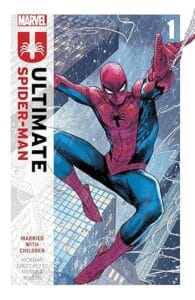
Ultimate Spiderman: The Paper by Jonathan Hickman (2025) – BR00304 (R2026) – ๐Ÿธ๐Ÿธ๐Ÿธ๐Ÿธโšช

The PolyBlog
February 18 2026

Plot or Premise

Peter and Harry try to figure out how to fight crime as a team.

What I Liked

I’m not a giant comics reader, but I’m enjoying the Ultimate series. Here the adult Peter Parker has figured out most of his roles and abilities, while working with Harry Osborne aka Green Goblin on the side of good. It was fun seeing them work with Doctor Octavius aka Doc Ock. Meanwhile, Kingpin has organized the Sinister Six to go after the dynamic duo, who go up against the first two. Meanwhile, Jonah, Ben, Gwen and MJ are getting The Paper going.

What I Didn’t Like

There’s a bunch of extended family stuff for Christmas that mostly goes nowhere fast.

The Bottom Line

More webslinging, less family drama please

Posted in Book Reviews | Tagged book review | Leave a reply

Ultimate Spiderman: Married with Children by Jonathan Hickman (2024) – BR00303 (R2026) – ๐Ÿธ๐Ÿธ๐Ÿธ๐Ÿธโšช

The PolyBlog
February 17 2026

Plot or Premise

After the Maker reshapes Earth so there are no superheroes, Stark’s son sends a message through dimensions to activate Spiderman with a radioactive spider.

What I Liked

I’m not a giant comics reader, but I always loved the Spiderman universe. I’ve seen the movies, watched a lot of the cartoons, grew up watching them in fact. So when I saw a list of books that some curators were doing of books they like to gift, and Ultimate Spiderman was on the list, I had to check it out. A few clicks later and I had the book file, plus an app to read it, and I was quickly immersed. I love the premise of Peter Parker becoming a superhero later in life, after he has already married MJ and had two kids. I even like the alternate timeline where Aunt May died, not Uncle Ben, and Uncle Ben works with J. Jonah Jameson at the Bugle. Seeing a different Peter Parker grow into the role is great.

What I Didn’t Like

Two things bothered me in the storyline. First and foremost, there is not near enough coverage of Peter learning to be Spiderman. Secondly, Osborne as a “good” Green Goblin is a little farfetched, particularly when you see him in business initially with Kingpin.

The Bottom Line

Photographer, webslingerโ€ฆDad? Yep, it works!

Posted in Book Reviews | Tagged book review | Leave a reply

Post navigation

← Previous Post

Countdown to Retirement

Days

Hours

Minutes

Seconds

Retirement!

One of my favourite sites

And it's new sister site

My Latest Posts

  • AI testing: The Bad…Time loops, tech support quirks, and driftApril 18, 2026
    By now, most people have seen some form of AI crop up in their tools. The most obvious one is Google’s search engine, which provides results from its AI mode first in the list. You can go pretty far with that prompt, even asking for image creation, although that’s a terrible place to create images … Continue reading →
  • More workplanning on my new Calibre libraryMarch 28, 2026
    I wrote earlier this week (Using Calibre to embrace my inner librarian for ebooks) about the Poly Library 3.0, and when I did, I thought I had most of my “work” done. I had decided on three main areas (the book profile, user engagement, and user tools), although, truth be told, I had four categories … Continue reading →
  • An update on Jacob…March 24, 2026
    For those of you who don’t know, as I didn’t blog about this much before, Jacob decided to have surgery on his legs this year, which he did at the end of February. I’ve held off posting anything as I didn’t want to ask Jacob what he was comfortable with me sharing, but today was … Continue reading →
  • Using Calibre to embrace my inner librarian for ebooksMarch 23, 2026
    I have used Calibre literally for years to manage all my ebooks. It started way back when Kindle was doing a huge business of people pushing freebies of their ebooks. Some good, some slush, all free. But it meant a LOT of ebooks to manage. So I tried a couple of programs, most of which … Continue reading →
  • What would you put in a personal health dashboard / framework?March 8, 2026
    I started this year with a few short plans to work on health factors in my life. Some of it was prescribed; I needed a physical exam for certain pension forms. Others were ones that I was trying to do some proactive work on, like my teeth and my feet. And still others were more … Continue reading →

Archives

Categories

© 1996-2025 - PolyWogg Privacy Policy
↑