Over at the Heath Brothers’ site, they have lots of little posts about making better decisions. I signed up for the newsletter at some point and they sent me one entitled “Six Simple Questions That Yield Better Decisions”.
I quite like the list, partly as it is about thinking your way out of a box that you might have put yourself in earlier without realizing it. We all have shortcuts in our thinking processes, and the six questions they suggest are designed to help you avoid “lazy thinking”:
1. Imagine that the option you’re currently leaning toward simply vanished as a feasible alternative. What else could you do?
2. Imagine that the alternative you are currently considering will actually turn out to be a terrible decision. Where could you go looking for the proof of that right now?
3. How can you dip a toe in the decision without diving in headfirst?
4. [For personal decisions] What would you tell your best friend to do, if he/she was in the same situation?
5. [For professional decisions] If you were replaced tomorrow, what would your successor do about your dilemma?
6. Six months from now, what evidence would make you retreat from this decision? What would make you double-down?
All of them are apparently developed in more detail in their book called Decisive, and I might see if I can pick it up. I certainly liked the list they forwarded.
Let’s start with a confession. I generally don’t like people. 🙂
Okay, that’s not really true, but I am an analytical introvert and extensive social interactions tend to exhaust me, not energize me. So a lot of volunteer options tend to be limited because, you know, they often want you to engage with people. 🙂 Financial books, website stuff though? I can handle that. Especially if I can do it in my track pants and t-shirt while sitting in front of my computer on a Sunday morning. And if I can submit/provide any views on strategic direction, if desired, by email? Count me in!
And I’ve said yes to three volunteer gigs.
AstroPontiac
My friend, Stephan, is organizing an astronomy park in Luskville, Quebec and I agreed to be on the board because (a) he asked and (b) I like the initiative. He is the one who introduced me to astronomy a few years back with a conjunction viewing (Mars and Venus, maybe?) and eventually helped me choose my scope much later. My role is not extensive or taxing. I’m on the Board, agree/propose motions, review proposals, and because he and I work in the same building, can easily sign documents when they’re being submitted to various entities or cheques are being issued. Pretty minimal, but useful to the Initiative. I also attend events when I can (hmm, not sure, I might be the only other Board member with their own scope, not sure).
But my “big” contribution is that I manage the website and handle the domain registration/renewals. It is not a particularly sophisticated website, more a simple page that says where it is and lists the events. When there is an observation night, I also post the “Go / No go” message to the site, once Stephan decides (he tweets it and updates on FB). The only quirk to the site is that it is bilingual. There are a few plugins in WordPress to help with that, but either I’m an idiot, or they’re finicky. I tried the most popular one but couldn’t get it to handle the menus properly. Instead, I’ve manually coded the pages using buttons and bypassed the menu option entirely. I tried bilingual pages, and the layout challenges were just too painful (often French text is longer than the same English text, which causes different lengths to side-by-side paragraphs). Eventually, when the site is bigger and in more regular operation, we’ll likely need a content creator and possibly a re-design, but it meets the needs and I can handle the ops for now.
School support
My wife is on the School Council for my son’s school, and they needed a webmaster-type person to be able to post documents, link things, etc. It is an extremely minimal role. I moved a few docs around when I started, just to put them all together in good order, created an “old page” for previous years and kept the current ones there. I often feel like I should be doing more, tweaking it more, but the load/need is pretty minimal. Most of the people accessing things are the members themselves. And for the other content, i.e. notices of bake sales or book sales or foodstuff, there is a content creator who directly posts all that themselves. I just have to watch the website and tweak it if something goes wonky. Easy peasy, lemon squeezy.
RASC Ottawa
Last year, the Star Party Coordinator was looking for a replacement so he could focus on other activities in the club, and so I took it over. The star parties are monthly free public stargazing events held in the darkened parking lot of the Carp Public Library, next to the Diefenbunker.
For my role, as the interim SPC, I was basically sending out a series of emails a week before to say “Star Party next week”, sending out the same series the day of the event to say “Yes it’s on” or “Postponed to the rain date”, and making sure there were Marshals at the site (to turn the lights off at the start, turn the lights back on at the end, and handle basic safety during the meeting). If I have Marshals attending, I don’t even have to GO to the star party. I do go, but the pressure is off if I want to leave early or arrive late, etc. We can share the on-site duties a bit.
So, with low-intensity involvement, I was happy to fill in as the interim SPC for last year. I also liked the idea of trying it out for a few months to see if I was willing to take it on longer-term. Turns out, I was indeed willing. So I became the SPC for 2018 too.
Now, I’m anal. And a planner. So the first thing I wanted to do was survey the members who go to the Star Parties to see what “else” they were looking for if anything. Not surprisingly, on-site washrooms popped to the head of the list. Second on the list was a light barrier to block car lights at the site, but really, that’s almost a parking issue. Washrooms and parking, the two biggies for any public event. Not surprising. But I asked a bunch of other questions too for interest and got some good results. (Survey results for RASC Star Parties in Ottawa for 2018)
However, I wanted to go a bit further. I wanted to know if other Centres were doing things that we weren’t. There are 26 RASC Centres in Canada, and I reached out to all of them to see if they were interested in a quick survey. A bunch were, some sent me some comments on questions, and about half filled out the overall survey. I found some really interesting results, and it helped build my confidence we were in the right ballpark with our approach. Some key takeaways for me were cross-promotion and pushing for more members-only observing, not just public events.
Did I have to do either survey? No, the process is relatively well-established, so I could have just done the same as last year and been perfectly fine. But it helped with some internal capacity-building.
This year, as full SPC, I also had to arrange a few other things that were already done last year:
Propose and confirm dates for the star parties (not as easy as that sounds!);
Approval from the library and Diefenbunker to use the space;
Insurance certificate from the national organization for our dates;
Contract with the city for formal consent to use the space on specified dates;
Put all the dates on social media, website, etc.;
Find field marshals for the year.
I will also be looking into portable toilet rental, and possibly a large tarp to block light. And, just for fun, I’ll be trying to figure out how to promote other viewing activities across the city and at other locations.
Is it more work? Sure. But I get a lot out of membership, including just maintaining my interest in the hobby for the first five years of alignment problems, attending the Star Parties myself and with my family, and last but not least, actually having members solve the problems with the scope (Solving alignment problems with the Celestron NexStar 8SE).
In the past, I admit I have felt somewhat disconnected from the club. It is surprisingly hard to bond with people when (a) you don’t generally like people hehehe and (b) the events take place in the dark where all you have are voices, no faces to remember for next time or at the monthly meeting.
As the official SPC for 2018 (can you tell I like the acronym SPC? Space / Star Party Coordinator, get it?), I was invited to attend the Council meeting this past month. And I *loved* it. I liked seeing the discussions on the direction of the club, finances, other events going on, etc. I could see myself getting more involved over time. But baby steps. I don’t need to take over the Galactic Senate for many years to come, and I have to develop my evil voice in the meantime anyway.
Adding in some money
Now here’s a bit of a question I don’t have my head wrapped around yet. Back when I was a bit younger with work, I was using the internal donation system to handle any charitable giving. But after doing a bit of investigating on United Way, overhead rates, etc., I realized I wasn’t comfortable with their approach. They have good comms people doing up bullet points to respond to these types of questions, but in the end, I decided the fund-raising costs were unconscionable on the front-end and mildly extortionate on the back-end. As such, I’ve tended to default to two other types of giving.
First, I let Andrea do the bulk of it since she manages most of the finances. Various societies, memberships, associations, etc., almost all funded directly.
Second, if a friend is raising money for x or y, and they need a sponsor, I’m often a soft touch. Even for United Way events at work — I may not want to support them directly, but if other people are putting their time and energy into it, heck, I’m willing to honour that commitment and initiative. Just don’t ask me to run the relay with you. What’s that saying? You need people to stand along the parade route too and clap? That’s me. As long as I don’t actually have to come out and stand there or clap. But, “good on ya”, I say.
So I wonder. I’m putting time and energy into the two astronomy efforts, why don’t I sponsor myself too? Something to think about. I confess I am a bad donor though. I like the idea of paying for specific things where I can think, “Hey, I paid for *that*” and to see what I got for my money rather than doing the proper thing which is to contribute to general revenue and trust the organization to put the money to the highest priority use. None of the ones involved have any salaries to worry about or real overhead, so why target my funds? Hmmm…
But that’s next year’s problem. This year, I just wanted to volunteer a bit more of my time.
I mentioned earlier this week that I had started my astronomy season for the year (Kicking off my 2018 astronomy season with two outings) and in the post, I shared two photos of cases I had set up for my gear (eye pieces and my filters). What I didn’t mention at the time is that this is also related to a #50by50 goal — organize my astronomy gear.
That seems a bit basic, doesn’t it? Why would I put organizing my astronomy gear into a plan for 50 things to do before I’m 50?
Simply put, because it is a bit of a proxy for myself. What I really wanted to say was, “Okay, I’ve committed to this hobby”, and one way to do that was to organize my gear properly. Let me explain.
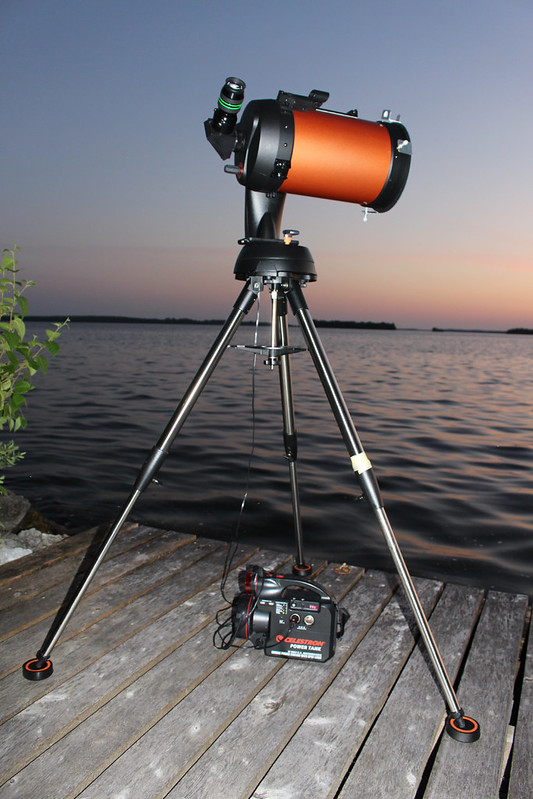
When I bought my scope, this is the setup / gear I got:
Now, looking at that photo more closely, you can divide some of the sections into separate categories:
The scope itself — the optical tube assembly (OTA) as they say in astro circles, or “the orange part” for the layperson;
The mount — You can’t see it but there is an arm going up the other side of the orange tube, and coming down to just above the top of the tripod, i.e. the “black part” before you get to the legs;
The tripod — The three silver legs; and,
The accessories — everything else.
My organization to date has been relatively done on the cheap. For the mount, I tend to leave it attached to the tripod, and move it all together as one piece. There’s a hand controller that attaches to it, and it regularly falls off and dangles, which is a pain, but other than that, it’s relatively safe to lie on its side, move it around, as long as I don’t drop things on it, drop it itself, or mistake it for a hammer to whack something with.
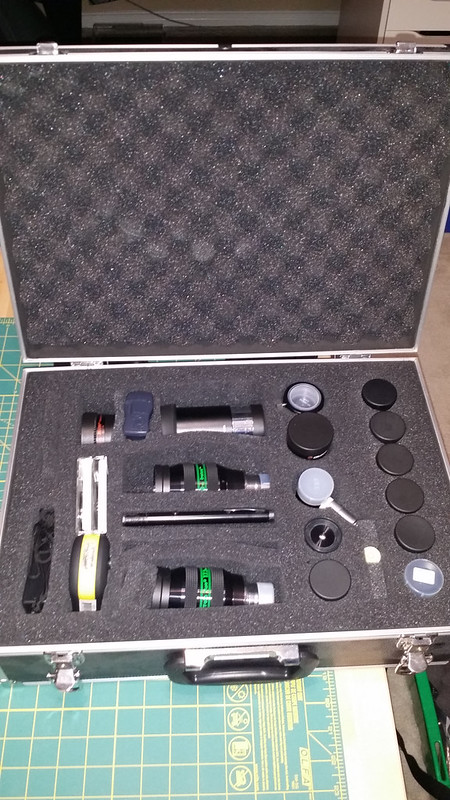
For all the accessories i.e. the eyepieces and filters mainly, I had been keeping them relatively loose in tupperware-type containers partly as it is easy to pop in some gel packs and control for any humidity. Plus, well, the plastic cases are cheap and come in different sizes. Add a bit of foam and they were good to go. But all the EPs together probably cost as much as the scope, and are more easily damaged, so I set up an aluminum case I bought on Amazon plus a plastic case (originally for a handgun) that I bought at Canadian Tire. A bit of pluck foam later, and Bob’s your uncle, I had two cases set up for the main accessories:
Which basically left me with one big question and one smaller one (how to transport the little accessories, easily ignored for now). For the big question, I had to figure out how to transport my scope safely. Here’s the challenge. The scope is relatively self-contained, has good framing etc., but it doesn’t handle hard knocks particularly well (you can knock mirrors out of alignment) and it’s kind of big. I have a good place to keep it in its own cupboard in the garage, so that wasn’t a problem, but I’ve been carefully transporting it to and from the car, while relying mainly on a large duffel bag to allow me to keep my hands free while I did it. It sounds a bit risky, but not really. I move everything carefully, I’m not walking around like it’s a gym bag with clothes in it. Plus the “soft” nature of the case let me “wrap” it evenly for support.
But just about everyone I know has a hard case of some sort for their scope to protect it. And if I’m going to be serious about my hobby, and my tools to do that hobby, I’ve been feeling like I needed a proper case too.
Now, Celestron will sell me one, specifically designed to fit my scope, all good. Except it is $300 and a very tight snug fit. If you have any peripherals added, they all have to come off apparently to fit in the case. Hmm. And $300? Pretty expensive.
So there are after market solutions people have done, mainly using Pelican cases. High quality, good reputation, can be ordered online. Even usually comes with pluck foam inside. Great. Except the case I need, or rather in the size I need, runs about $300. Noticing a pattern?
My friend Rennie just did one for his scope, but he had a large case to use, and he wanted his mount to fit inside too. I admire his commitment to set that up on the scope everytime, I’m too lazy to keep doing that. But I wanted a case still for the tube.
I visited Home Depot and found this GREAT tool box, 28″ long. Seemed PERFECT. Brought it home, tried it out, and the scope fit! Except it didn’t, not really. Lengthwise it was fine. But for girth, it was right against the sides of the toolbox, no room for any foam or padding. In other words, any knock on the case would directly transmit to the tube. No dice. I tried another from Canadian Tire, and the girth was a little better, but the length was off by an inch or two. I could take a couple of accessories off, but then everytime I use it — which is mostly in Ottawa by percentage — I would have to put things back together. To give you an analogy, it would be like a camera case where you had to remove the batteries, memory card and lens everytime you put the camera in. So when you went to use it, you would have to reassemble all the pieces. Every time. And for me, the more time I spend on setup, the less time I spend observing and the less frequent I’ll even go. Kind of like the friction test for purchases — more hurdles, less purchases.
So I started looking at larger cases. Almost all of the ones up to $100 or so were too short. Some came close, but when you opened them up, the insides had these extra grooves and dividers that were permanent and meant you didn’t have the full space available. I tried Home Depot, Canadian Tire, Rona and Lowes, plus about 10 stores online (including Amazon). I finally found a couple of options in the $119 range, but they weren’t quite right for size and shape (Dewalt / Stanley versions). Doable, but not sold. I did find one that laid a bit flatter, and had some extra room in it that seemed really interesting, but the only reviews I found online said that it was rather flimsy and the handles and hinges tended to break. For $120? I wouldn’t be using it as heavy (most people use them for tools), but I wouldn’t want to be carrying it and have the handle break off.
Which put me in the $170 range for some really solid Dewalt models (although the Husky and Stanley versions were good too). They came with wheels, and lots of extra space. But that extra space comes at two costs — the extra $$ involved, sure, but also the extra real estate in the car. I originally was hoping for something I could use to take the scope to the cottage too, but I have ways around that I suppose.
One nice feature that I have, and I don’t know how long it will last, is that when the scope arrived, it came in a cardboard box with form-fitting packing form. The cardboard box is rubbish, but I can put the foam in a different box, and then pack my scope in it. In the end, I decided that if I was going to go “big”, I might as well just get myself a simple tub. Total cost? $13. Plus there’s room left over for suppression pads (they go under the tripod legs to reduce vibration), my power cord, my filter case (yay it fits, boo the EP case doesn’t), my light, and wonders of wonders, it will also hold my solar filter in its original packaging as I have no other way to keep it safe). Is it awesome, worthy of emulation? Nope. I’ll also have to decide if it is too heavy with everything in it or not and which objects I will keep in the box. Sigh.
It’s functional and can do the job perfectly fine, and at a tenth the cost. The tube sits underneath in the white foam, with parts and accessories down the side, and the regular filter case plus solar filter on top.
Works for me. I’m committed to the hobby, I’ve got cases to protect my gear!
I like using our digital photos for different things — the website, a digital photo frame, some prints around the office, custom calendars, etc. And annual photobooks — a Year-In-Review style that goes month-by-month. Except I’m a bit behind on them, having only completed three or so of the last 13 years worth of organized digital photos that are in my digital gallery. So when I added “Make a Photobook” to my #50by50 list, it wasn’t a specific commitment like “Make a photobook of (someone’s) wedding” or “Make a photobook of a specific trip or year”, it was “knock one off the long list of photobooks you want to do” i.e. get back into making them.
Starting with a Year-In-Review book
Just over two years ago, I took a look at several websites that offer do-it-yourself photobooks, and I gave a bunch a try. Some of them failed for software limitations, others for their variable quality. I pretty much ended up going strictly with Shutterfly in the end. For my new YIR book, I thought I might as well start with Shutterfly again.
Shutterfly is a solid site overall, with all the basics plus some bells and whistles. They have regular coupon deals, established history, and I can reuse/copy old projects to incrementally improve each year while keeping some basic consistency. And lots of extra product possibilities like mousepads, notepads, notebooks, magnets, mugs, etc. I re-familiarized myself with the site and didn’t see any major changes in the functionality of the web design in the last two years, still no downloadable software to do it and then upload as one piece but rather still just all online, and the default templates for “years in review” are still not particularly attractive (only two main defaults from which to choose). Still, a solid choice. There are e-share options too, but I’m not particularly attracted to them nor do I need the option since I have my own photo gallery site with more content than would go in the books.
I bit the bullet. I put together a year in review (or actually a partial year in review) for the second half of 2010. In so doing though, I wanted to revisit the basic design of their template and see if I could create a new master template that I could reuse for future YIRs. Some of it was quite simple — adding background colours, putting in the months of the year, making sure every month has at least four pages to start with, etc. It took me most of a day to put the template in some form that I could call a “master” draft to build from for the future, but I only have to do it once and it probably took me longer as I was coming back “new” to the software/website. I then copied it over to a new project for a backup. And then used that to create “2010 – Book 2”.
Choosing the photos is a bit more of an iterative process than one might think. Here’s my general work-flow:
a. I copy all the photos from Andrea’s phone, the compact point-and-shoot camera, my phone, my tablet (rare), and the DSLR, plus any that others happened to send us of shared events into a set of photos by month;
b. I then sort them into days and events;
c. I pick the best ones for uploading, sending everything else into sub-folders called “extras”, keeping about one for every 2-3 that go in the extras folder (I don’t delete photos unless they’re blurry or technically wrong for some other eason…I’ve gone back too many times to a photo that was perhaps good for everyone, but in looking at the extras, I find one that is GREAT for a specific person, allowing me to crop it to just them);
d. For a Photobook, I start with the web choices, and weed it down to a smaller list of possibles, and then let Andrea weed even further.
I uploaded the weeded set to Shutterfly and the template worked almost perfectly. A couple of little tweaks here and there, but not enough to warrant changing the master, more tweaks for colouring with the photos I was laying out in the template. I added some prose, chose some photos for the covers and inside page, and bam! I submitted the book with a 50% off coupon. Sweet.
Now I just have to wait.
Considering a Trip Book
I’m willing to experiment with other sites, just to try them out, and I’m going with some trips as the theme. But which one to try?
a. MixBook
Last time I tried Mixbook, the software was a bit unwieldy. This time, I found 11 templates for “Year in Review” style books. The Minimalist style was a bit black and white, but cute; Linen / Vintage / Colourful YIR / A Year to Remember / Year in Review / My Year Magazine / Graduation Year in Review / Watercolour Year in Review are all more thematic or event-driven than I would like. The one called Family Yearbook would be an awesome style for people with multiple kids and I could see easy ways to adapt it. However, the Kraft Year in Review is outright awesome. Simple chronological design, exactly what I am looking for in YIR-style without weird or wonky titles for each month. My only complaint is it is a bit drab … most of the layouts could benefit from a bit more colour per page. The software seemed to work okay, and as with most, you do a lot better with everything pre-chosen before you start. Definitely a viable option, and an improvement over previous attempts.
b. Costco
Since the last time I tried, CostCo has updated their software and their book builder looks a little better, albeit somewhat slow to get it to click over to the “ready” stage. Or more specifically, it goes off to “prepare” the book for editing and never returns. Just sits and “spins” that it is doing something and never finishes. Maybe it doesn’t like Firefox, maybe the site is busy, I don’t know. Pass.
c. Shoppers Drug Mart
The software seems better this time than last, and I was able to navigate through a few choices to get to a reasonable option for a book. I chose their one and only Year in Review template, and it isn’t bad. The overall layout and control options are much more basic than other sites, but that isn’t necessarily a bad thing — some of the others are a bit overkill. Definitely a viable option I might consider.
d. Loblaws
If you go to the Loblaws site, you won’t find their photo book options because their photo service is separate — aka Photolab.ca. And it looks surprisingly familiar. Like with my previous review, Loblaws has the exact same software as Shoppers Drug Mart for their site, it just has a different name. But functionality, templates, etc are the same. So again, a viable option.
e. Uniprix
I wasn’t overly impressed the last time I tried the UniPrix site, but a friend suggested I give it another try, as he had good luck with it. So I gave it a go. Like SDM and Loblaws, it has some basic options, nothing extravagant. And while the opening interface is different, the final operations are almost identical for the software with Loblaws and SDM. A few differences, for sure, but functionally the same.
f. Blurb
PhotoBookGirl is an online reviewer of photobook designs, and she has a bunch of reviews of different photo sites (mainly in the U.S.), so I wanted to give a few of them a try too. Blurb was up first. Blurb has some amazing options to upload a PDF and to sell things onwards into Amazon, but that’s not my focus. When Blurb Bookify starts, you get to the editing options pretty quick but that’s because the main options of other sites — draft templates, layouts, etc. — are all missing. Pass.
g. Bookemon
Like Blurb, it has options to create a book for sale — including kids books, etc. But the templates that come with it, and the basic interface are a bit too menu driven and mechanical than designed to populate things for you. Pass.
h. Clark Color Labs
The software for CCL is pretty clean. I set up an account easily, uploaded some photos pretty fast, and wandered through their templates. I’m looking for Year In Review designs, and while there weren’t many (only 3), they were all quite vibrant in colour. A very different look and feel to the template than Shutterfly or even Mixbook. The only challenge was that some of the months were set for a single page, others were spread over two, with no rhyme or reason. Plus there didn’t seem to be a reason why in some months they chose to put the name of the month on the page and others just a symbol (St. Patrick’s Day images for March, for example). Where they make up for some of it though is in their easy to access clipart. On a lot of sites, it is hard to find good clip art to add to the layout, but they make it pretty easy, and it was easy to add the months of the year for example or change a background. Overall a pretty simple and direct option. I have no idea if the quality out the other end is any good, but it’s a pretty nice site.
i. Picaboo
The site has some power, no doubt, and if you want to start from a very minimalist book layout, it’s a great choice. There are only five main themes, variations on “white”, but no choice between a year in revew or a trip or graduation. You can add all that, but you start with a blank template. Not a problem, but why would I want to do all that extra work unless I was starting with a very unique project? Pass.
j. Snapfish
Upfront, Snapfish has some great opening choices in sizes. I’m mainly interested in the landscape 8 x 11 books, but there were quite a few other choices too. When I chose YIR, just because it is an easy way to decide if it’s viable or not, eight sample templates came up. Most of them are comparable to the Shutterfly and Mixbook options, so nothing to really sell me there. Clicking on “Travel” pulled up another 12 options. One of them was called Road Trip (which a lot of my trips are), and pre-organized around Day 1, Day 2, Day 3, etc. So a viable option again.
So that gives me a full dozen options, including the original Shutterfly.
I’ve passed on: Costco, Blurb, Bookemon, and Picaboo;
I’m considering: Mixbook, Shoppers/Loblaws/Uniprix, Clark Color Labs, and Snapfish.
However, there is one small feature I like about the Shoppers / Loblaws / Uniprix option. I can print it and pick it up. No shipping required. And while I can’t guarantee the quality until I try it, it’s also not likely being shipped off to the lowest common producer elsewhere. There is a bit of local production involved. I hope at least. So I’ll try one of those three first.
I’ll see how it goes and update later. In the meantime, I’m waiting for my YIR book for 2010.
I like writing book reviews and sharing them, and so it was a no-brainer to add book reviews to my #50by50 list. I toyed with writing 50 of them, or making it a reading goal for 50 books, but then I realized it was simpler that I focus on writing and posting the reviews in a more manageable goal. I have a bunch of other books to review, but I’m going to declare this one “done” since I’m already at 13 book reviews since my birthday, with two of them non-fiction (yay me!):